Subscription Auto-Renewal Guide for M2M Users
Subscription auto-renewals can be set up on a self-managed platform using NovAtel’s integrated Machine to Machine (M2M Machine-to-Machine) APIs for efficient subscription management. Once set up, payment checks and reminders will be sent and a new subscription will be automatically purchased prior to the end of the current active subscription. The renewed subscription can be any service, as specified in the part number parameter in the API Application Programming Interface, and will start following the end of the active subscription such that there will not be service disruptions . For additional information on how and when activation and dispatch messages are received when a subscription is purchased, see Subscription Behavior.
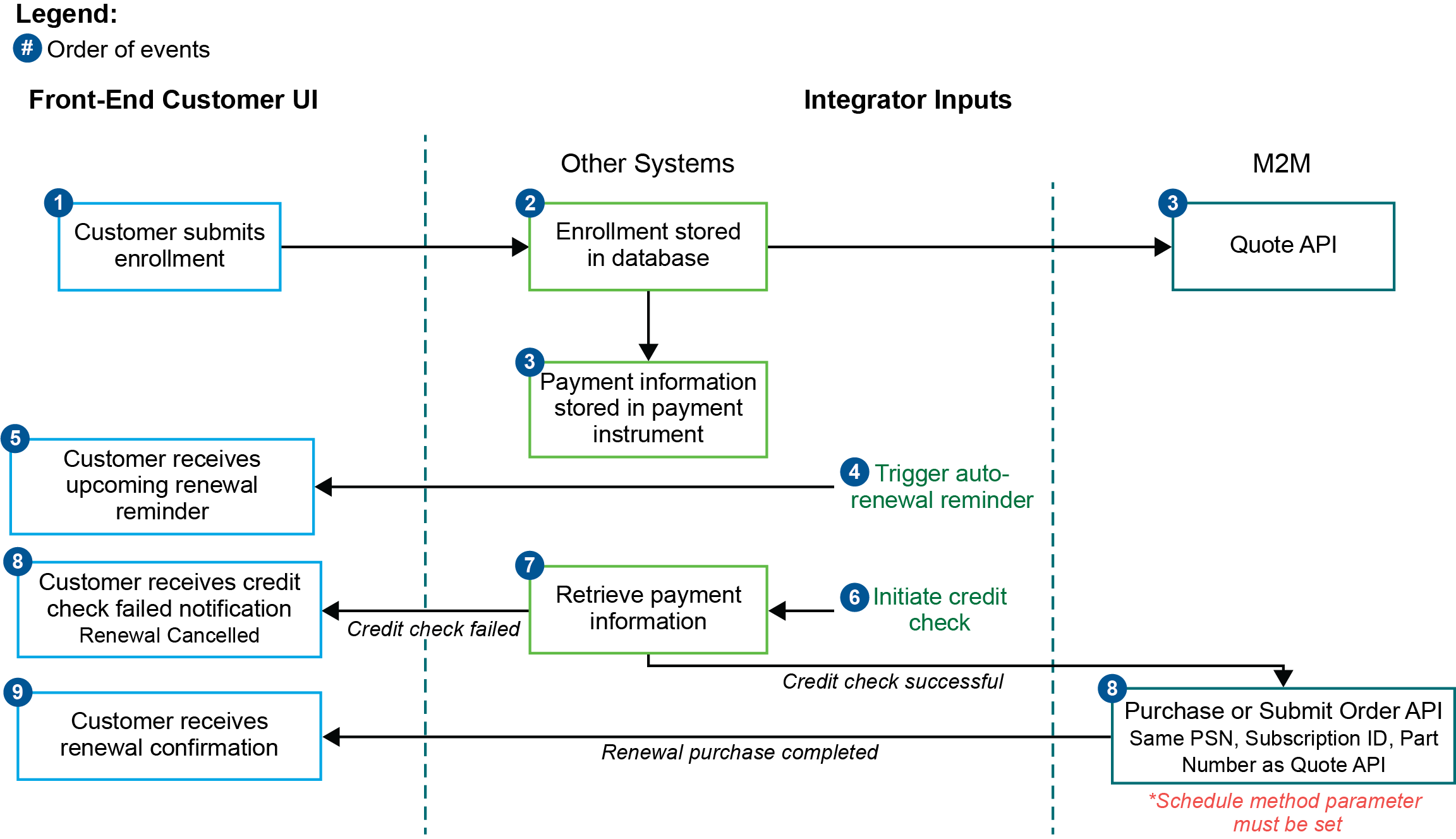
The following diagram illustrates an example process flow of an auto-renewal set up in the M2M portal :
Best Practices for Setting Up Auto-Renewals
The following sections outline recommendations for the front-end of an auto-renewal feature that can be set up by an integrator. For the purpose of this document, the NovAtel eStore will be referred to as an example.
Auto-Renewal Enrollment
A mechanism must be in place to allow for customers to enroll for a subscription’s auto-renewal. A similar mechanism should also be available for unenrolling an auto-renewal.
It is suggested that an interface for auto-renewal enrollment be available either during purchase or after purchase where customers view the subscription details, such as in the screen shot below from NovAtel’s eStore.
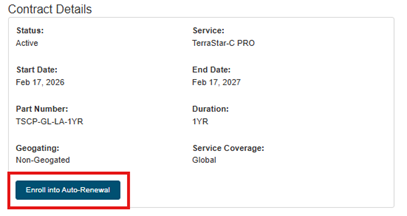
To enroll, the following must be submitted by the customer:
-
Read and agree to the Terms and Conditions.
-
Payment Options – can include multiple, such as credit card and purchase order.
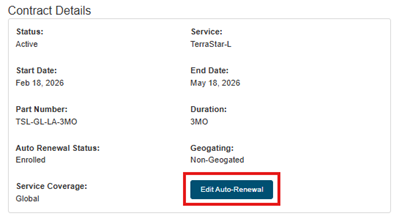
A mechanism to edit auto-renewal information (for example, changing payment methods) and to unenroll from auto-renewal should be available at the same place as enrollment. In the screen shot below, the button to edit is on the same page and section as the enrollment button:
Payment Storage
For customers that wish to use credit card as a payment option for auto-renewal, the system will need to store an identifier for the customer’s credit card. Most of the payment gateways and processors provide this functionality, where the credit card information needs to first be tokenized and sent to the payment gateway or payment processor to get a unique customer card identifier, which can then be stored in the system. This method turns PCI compliance and security of information to a third party liability rather than a liability of the platform.
Required APIs
The following three APIs can be used to set up an auto-renewal, triggered in the order listed below:
-
Quote – retrieves renewal transaction information. This API should be run prior to the renewal date.
-
Credit Check – if the customer is purchasing using specified payment terms, such as a purchase order, confirm that sufficient funds for the quote is available. This should be run after the Quote API and before the renewal date.
It is suggested to do a credit check if necessary 14 days before the renewal date so that the customer can be notified of any failures.
-
Pre-authorization – if the customer is purchasing using a credit card, submit a pre-authorization through a payment gateway or processor to confirm that valid credit card payment is available to complete the renewal purchase.
It is suggested to do a pre-authorization, if necessary, 14 days before the renewal date so that the customer can be notified of any failures.
-
Credit check or pre-authorization should also be submitted to confirm that there are sufficient funds / a credit card payment method to complete the purchase from NovAtel.
-
Purchase (single line order) or Submit Order (multiple line order) – on the renewal date, process transaction with either the Purchase or Submit Order API.
Schedule method parameter must be set
The Quote and Purchase API must include the same parameters values for PSN, Subscription ID and Part Number.
Notifications and Reminders
Customers should be notified of upcoming auto-renewals and credit checks. The following are the suggested notifications to be sent:
-
Upcoming auto-renewal reminder – recommended to be sent 30 days prior to the renewal date of the subscription and should also include information about when the credit check will be done, including a reminder to ensure payment is properly set up.
-
Credit check or pre-authorization failed – recommended to be sent 14 days prior to the renewal date of the subscription. It should notify the customer that the credit check or pre-authorization has failed and automatic renewal has been can celled. The renewal for the upcoming service period should be done manually but enrollment will have to be completed again for the following service period.
-
Successful renewal notification – confirm renewal and start date of the new subscription