Storage
Use the Storage window to manage the log files saved on the receiver's internal storage.
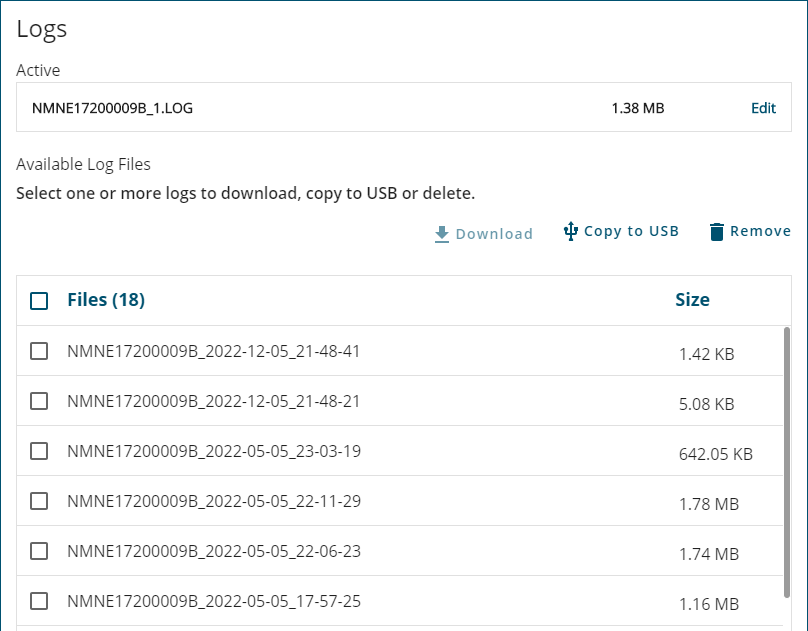
Edit active log file
To edit the active log file, click the Edit link beside the active log file. The Logging configuration window displays. Make any changes required to the messages being stored in the active log file.
If you click the Stop All button on the Logging configuration window, the log file will be closed and added to the Available Log Files list.
Download
Log files stored on the receiver's internal memory can be downloaded to the computer running NovAtel Application Suite. To download files:
-
Select the check box of one or more of the log files in the Available Log Files box.
To select all of the log files stored on internal memory, click the Files option.
-
Click Download.
-
Navigate to the folder on the computer where the file will be saved.
-
Click the Save button.
Copy to USB
Log files stored on the receiver's internal memory can be copied to a storage device connected to the receiver's USB Host port (Transfer port on PwrPak7). To copy files to a USB device:
-
Connect a storage device, such as a USB memory key, to the receiver's USB Host port.
-
Select the check box of one or more of the log files in the Available Log File box.
To select all of the log files stored on internal memory, click the Files option.
-
Click Copy to USB.
Remove
To delete log files from the receiver's internal memory:
-
Select the check box of one or more of the log files in the Available Log Files list.
To select all of the log files stored on internal memory, click the Files option.
-
Click Remove.
A confirmation dialog displays.
-
Click Yes to delete the log files.